Tiernan's Comms Closet

Geek, Programmer, Photographer, network egineer…

Currently Viewing Posts in Software

Setting up Claude for my Dev Work

Ok, ok, before anyone says anything: yes, AI can be bad, but it can also be good. This post was not written by AI (it did review it, mostly for spelling and grammar). Some people think I don’t have any intelligence either… but that’s a different story.

Anyway, I’ve been using Claude Code and Desktop for a while to help with different personal projects, and I’ve added a few things to my setup to help with tasks. Here’s the list of what I use and what each one does.

  • jCodeMunch: Indexes your repo so the agent can pull just the function or class it needs instead of reading whole files. It helps organise large repos and makes it easier to find things in a project. Handy bit of kit. They claim it “cuts code-reading tokens by as much as 95% or more.” Free for non-commercial use; commercial use needs a one-time licence (from $79 for one developer). Haven’t purchased a licence yet, but plan to get it soon.
  • Context7: An MCP server that gives your AI agent up-to-date documentation for the libraries it’s working with. The free plan covers public libraries and 1,000 API calls a month; Pro ($10 per seat per month) adds private repos and gives 2,000 API calls. Pricing page has more details.
  • Headroom: Sits between your AI agent and the model endpoint and compresses tool outputs, logs and files locally before they’re sent. It’s available as a library, proxy or MCP server, and it’s open source (Apache 2.0). I’ve been running it for the last week or so and it has saved me about 5.6 million tokens so far. Heads up: it sends anonymous usage stats by default. Set HEADROOM_BEACON=off to disable them.
  • rtk: A single Rust binary that hooks into your agent and rewrites shell commands (for example, git status becomes rtk git status) so the model only sees compact output, reducing the data sent to the AI endpoint. Also open source (Apache 2.0). Note that it only filters Bash commands, not Claude Code’s built-in Read/Grep tools, and the “up to 90%” figure is a cut in command output, not your whole bill.

That’s what I’m currently using, but I’ll probably add more over time. If you’re using something I’ve missed, let me know.

Pricing and licence details as of September 2026.
VMware Workstation Pro and Fusion Pro now available for free for everyone

Back in May, VMware announced that VMware Workstation Pro and Fusion Pro would be free for non-commercial use. This was fantastic news for non-commercial users. However, a few days ago, they made an even better announcement: the free edition is now available to all users, including commercial users. While you can still purchase a license if you require support, the free version functions just as well, albeit without any support.


It appears that they are discontinuing Workstation Player and Fusion Player, as the functionality they offered is now included in the free version of Workstation and Fusion. 

How to Download Windows Server 2025 ARM edition (workaround)

In my previous post, I mentioned that Windows Server 2025 had gained general availability, but I had no information about the ARM64 version. It appears that 4sysops has found a workaround. You can download an ARM version of Windows Server 2025 from uupdump.net. Since I have a few M1/M2 Macs lying around, I’ll try downloading it and see if it works on them. I’m curious to know how long it would take someone to get this running on a Raspberry Pi. I believe they would make excellent little AD/DNS/DHCP servers. 

Windows Server 2025 GA’ed, along with System Center 2025

Microsoft has just released Windows Server 2025 and System Center 2025 in General Availability. You can find more information on the Microsoft Release status site.

Current status as of November 1, 2024 Windows Server 2025 is now generally available. It delivers security advancements and new hybrid cloud capabilities in a high performing, AI-capable platform. Windows Server 2025 is Microsoft’s latest Long-Term Servicing Channel (LTSC) release for Windows Server. To download a free 180-day evaluation, visit the Microsoft Evaluation Center. To learn more about Windows Server’s Lifecycle Policy, see the Windows Server 2025 lifecycle article. 


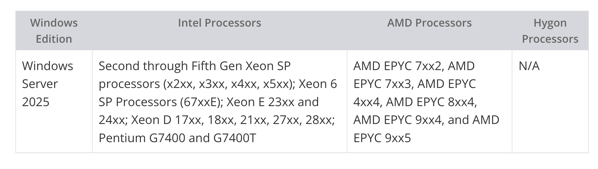
One aspect that hasn’t been discussed yet is the release of ARM64 support. While there were some ARM64 releases during the testing phase in the insiders group, there’s no official word on the GA versions yet. Additionally, here are the minimum requirements for CPUs (From Neowin).

The GodBoxV3, equipped with its first-generation Xeon SP processor, requires an upgrade to transition to Server 2025. Hmmm….
